getProgramAccounts (15ms p50 for top dexes) & getTransactionsForAddress (signatures and transaction data in a single call). Unlock Now!How to stream and parse Raydium transactions with Shyft gRPC

Team Shyft
· January 22, 2026
In this article, we will see how we can stream real-time Raydium liquidity pool v4 transactions and parse them using Shyft’s geyser-fed gRPCs and tx parsers.
gRPCs are the fastest way of getting the real-time updates happening on Solana. Using Shyft’s worldwide gRPC network you can filter and stream any kind of real-time events such as account updates, transactions, blocks and slot updates on Solana under milliseconds. In this article, we will explore how we can receive Raydium v4 transactions in real-time using Shyft’s gRPC services.
In case you want a complete code snippet example to follow along, feel free to fork this replit. Don’t forget to add the gRPC url and access token in the secrets section. Please refer to the ‘Before Getting Started’ section for more details.
Before Getting Started
To get started, we will need a few things.
Authentication: Your Shyft API Key, gRPC endpoint and gRPC token
You can get your own Shyft API Key(an auth parameter used by Shyft) from the Shyft website. You can also find your region-specific gRPC endpoint and access token on your Shyft Dashboard.
A server-side backend (like NodeJS) to receive gRPC data
As gRPC services are unsupported in web-browsers, you would need a backend application to receive gRPC data. For this example, we have used NodeJS, but any other backend server side languages such as C#, Go, Java, Kotlin, Python or PHP can also be used.
Steps Involved : A Summary
Geyser Plugins are modular tools designed to transmit data about accounts, slots, blocks, and transactions to external data stores. Shyft’s Geyser fed gRPC provides streaming services for account updates, transactions, blocks and slot updates, as soon as they happen on-chain. However, setting up a gRPC stream requires a few simple steps,
- Getting a region specific gRPC URL and Access Token
- Initializing the gRPC Client
- Setting up a gRPC stream for Raydium v4
- Receiving and parsing transactions
Getting a gRPC url & access token from Shyft
Shyft’s region-specific gRPC url is available in the dashboard and access tokens are available in their discord server. Please refer to the ‘Before Getting Started’ section for more details.
Initializing a gRPC client
Shyft provides Yellowstone gRPC nodes, from Triton, which has a lot of pre-built client libraries in various languages to interact with the gRPC interface. Some of the supported languages and their clients:
- Rust: Available at Triton GitHub — Rust Client Example
- Golang: Available at Triton GitHub — Go Client Example
- NodeJS/Typescript: Available at @triton-one/yellowstone-grpc —Socket
For this article we have used the NodeJS client, but can choose any client as per your requirement. First, we proceed by installing the NodeJS client in our project, by using the following command:
npm install --save @triton-one/yellowstone-grpc

yarn add @triton-one/yellowstone-grpc
Once we have the NodeJS client Library installed, we can now initialize the client. We simply have to import ‘Client’ class from the[@triton](http://twitter.com/triton)-one/yellowstone-grpc SDK. The constructor for the Client class takes in two compulsory parameters, first the Shyft gRPC endpoint, and the gRPC access token, which were already obtained in the previous step.
Get Team Shyft’s stories in your inbox
Join Medium for free to get updates from this writer.
A gRPC client can be initialized in the following manner:
import Client from "@triton-one/yellowstone-grpc";

const client = new Client(
  "https://grpc.us.shyft.to", //Your Region specific Shyft gRPC URL
  "hbdj-asjnf-access-token-asdh", //Shyft gRPC Access Token
  undefined,
);
One we have initialized the client, we can now call any of the client methods. Please note that the client operates asynchronously, so all calls should be executed within an async block or async function.
Setting up a gRPC stream for Raydium Liquidity Pool v4
The key to receiving real-time updates from gRPC is through subscription streams. Shyft gRPCs allow you to subscribe to specific data streams using the subscribe() method. This method returns a stream object that emits updates as soon as they occur on-chain.
const stream = await client.subscribe();Once we have the subscription stream created, we can send a subscribe request to Shyft’s gRPC interface in order receive specific updates streamed to our backend server. With gRPC, we can receive account updates, updates related to a particular program, filtered accounts, transactions etc, and each of this subscribe requests have different formats or parameters. For this example, we are subscribing to real-time streams of Raydium Liquidity Pool V4’s transactions, so the subscribe request is somewhat similar to this:
const req = {
  accounts: {},
  slots: {},
  transactions: {
    raydiumLiquidityPoolV4: {
      vote: false,
      failed: false,
      signature: undefined,
      accountInclude: [RAYDIUM_PUBLIC_KEY.toBase58()], //Address 675kPX9MHTjS2zt1qfr1NYHuzeLXfQM9H24wFSUt1Mp8
      accountExclude: [],
      accountRequired: [],
    },
  },
  transactionsStatus: {},
  entry: {},
  blocks: {},
  blocksMeta: {},
  accountsDataSlice: [],
  ping: undefined,
  commitment: CommitmentLevel.CONFIRMED, //for receiving confirmed txn updates
};
Once this is ready, we need a function to handle the stream of transactions we will receive for Raydium V4 as soon as we execute the above subscribe request. The stream.on(“data”, callbackFunc())callback function to handle the stream received, as illustrated below.
const stream = await client.subscribe(); // Create `error` / `end` handler
const streamClosed = new Promise<void>((resolve, reject) => {
stream.on("error", (error) => {
console.log("ERROR", error);
reject(error);
stream.end();
});
stream.on("end", () => {
resolve();
});
stream.on("close", () => {
resolve();
});
});
// Callback function which receives the transaction and handles updates
stream.on("data", (data) => {
if (data?.transaction) {
//data.transaction is the received raw transaction
const txn = TXN_FORMATTER.formTransactionFromJson(
data.transaction,
Date.now(),
);
//received transactions can be further processed as per applications requirement
//for this example we have parsed the received transactions
const parsedTxn = decodeRaydiumTxn(txn);
if (!parsedTxn) return;
console.log(
new Date(),
":",
`New transaction https://translator.shyft.to/tx/${txn.transaction.signatures[0]} \n`,
JSON.stringify(parsedTxn, null, 2) + "\n",
);
}
});Receiving and parsing the transactions
Once we successfully setup the stream handler, we should start receiving transactions related to Raydium Liquidity V4 in raw format. We can perform any operations on them, like simply displaying to the users, storing to a database, or parsing them and using the parsed information to do some additional operations as per the requirement of our application.
function decodeRaydiumTxn(tx: VersionedTransactionResponse) {
  if (tx.meta?.err) return;
  const parsedIxs = IX_PARSER.parseTransactionWithInnerInstructions(tx);
  const programIxs = parsedIxs.filter((ix) =>
      ix.programId.equals(RAYDIUM_PUBLIC_KEY),
    );
    if (programIxs.length === 0) return;
    const LogsEvent = LOGS_PARSER.parse(parsedIxs, tx.meta.logMessages);
    const result = { instructions: parsedIxs, events: LogsEvent };
    bnLayoutFormatter(result);
    return result;
}
For this example we have used Shyft’s transaction parser to parse the received transactions from the gRPC. To know more about parsing transactions please refer to our blog on how to parse transactions on Solana.
One of the scenarios, where this is particularly useful is tracking Raydium Swaps in real-time. Here is an example of a parsed Raydium Swap transaction,
Press enter or click to view image in full size
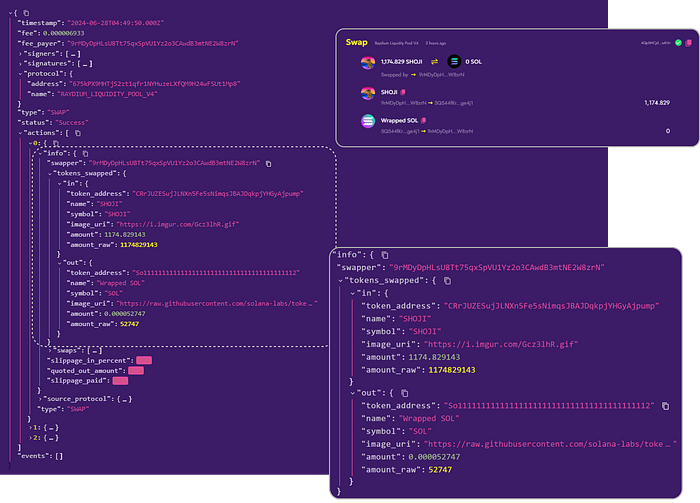
Parsed Swap transaction from Raydium Liquidity Pool v4
From this parsed data, we can obtain various pieces of information such as the tokens involved in the swap, the swapped amounts, and the swapper address. With transactions being streamed in real-time, this information can be promptly parsed and utilized in any necessary application.
You can find the code snippet for the above example in this replit code here. Just add your gRPC url and access token in the secrets section to give it a spin.
Conclusion
In this article, we’ve shown how to stream Raydium v4 transactions in real-time using SHYFT’s gRPC services. With gRPC’s speed and SHYFT’s global network, setting up real-time data streams is quick and efficient. This affordable solution is perfect for self-hosting APIs, running trading bots, and building real-time data applications. Get your API key, and start streaming today!
If you liked this article on gRPC streaming on Solana, do check out our other article on Building a Telegram Trading Bot with Shyft and Jito Bundle or Tracking real-time orca events. We hope you have a great time building dApps with SHYFT.
Resources
Related Posts

How to Stream and Parse Pump AMM Transactions on Solana Using gRPC
Learn how to stream and parse real-time PumpSwap AMM transactions on Solana using Shyft’s Yellowstone gRPC. Includ...
January 24, 2026
How to get parsed Pumpswap AMM Pools on Solana
In this article, we will explore how to fetch parsed pump fun’s newly introduced pump AMM data ...
January 23, 2026
How to stream Bonding Curve Transactions on Pumpfun
Learn how to stream Pump.fun bonding curve transactions on Solana using Shyft’s Yellowstone gRPC. Detect buy/sell ...
January 22, 2026

Get in touch with our discord community and keep up with the latest feature
releases. Get help from our developers who are always here to help you take off.