How to get decoded Solana Transactions

Team Shyft
· January 21, 2026
Transactions on Solana contain instructions to be executed by the runtime. This article is about fetching parsed transactions on Solana, simplified to the point where it is humanly readable.
Program execution on Solana usually begins with a Transaction being submitted to the cluster. A Transaction on Solana typically consists of a set of instructions decoded and executed by the Solana Runtime to perform some task on the Blockchain. Transactions also contain a set of program accounts that are involved in the instructions to be executed. This is quite similar to a bank or financial transaction, where some amount of currency is either added or deducted from an account.
If we parse any of these transactions, we can understand what operations have actually occurred in that transaction, including the associated accounts, token address, mint, change in token balances, etc. Most Web3 applications involving either minting tokens, and NFTs or displaying wallet data may require parsed transactions from the wallet. Since wallets contain innumerable transactions, it is important that we fetch all the transaction data in minimal steps or substeps. SHYFT provides a very easy-to-use one-step API-based solution for getting parsed transaction data on Solana. Let’s find out how we can retrieve parsed transaction data using this using SHYFT APIs.
Read SHYFT API Documentation here.
Getting a parsed transaction history
SHYFT provides a one-step API-based solution for getting details of a transaction on Solana. The API endpoint for getting data related to a single transaction.
GET <https://api.shyft.to/sol/v1/transaction/parsed>This API accepts the x-api-key in the API request header, an authorization parameter is used by SHYFT. You can get your own API key from the SHYFT website for free here.
The parameters required for this API call are:
network: Selects the Solana network cluster, which can be eitherdevnet,testnetormainnet-beta.txn_signature: Signature of the transaction which is to be parsed. The transaction should be from the cluster specified in thenetworkfield.
Once successfully executed, the response returned looks somewhat like this.
{
    "success": true,
    "message": "Transaction details fetched successfully",
    "result": {
        "timestamp": "2022-08-28T13:25:09.000Z",
        "fee": 0.000005,
        "fee_payer": "GyqoamVnBFR1eup3PRMF1uhBAB3cptiYHRsFa5H3YzPm",
        "signers": [
            "GyqtamVnBFS1eup3PRMF1uhBAB3cptiYHRsFa5H3YzPm"
        ],
        "signatures": [
            "2ktQS9BwubEjx46oN4j56qKcdubqURQy6bGNBHYDknTzitiMhqqDCvSkSrHtHYd1UdnqTBfUi7fRx4Tv7pznewoL"
        ],
        "protocol": {
            "address": "TokenkegQfeZyiNwAJbNbGKPFXCWuBvf9Ss623VQ5DA",
            "name": "TOKEN_PROGRAM"
        },
        "type": "NFT_TRANSFER",
        "actions": [
            {
                "info": {
                    "amount": 1,
                    "receiver": "E791QW72VB9hSkNWzugAtuFm764FYgcw9d1oiPgSzu1C",
                    "sender": "GyqtamVnBFR1eqp3PRMF1uhBAB3cptiYHRsFa5H3YzPm",
                    "receiver_associated_account": "6jWL9PugCvyorggcc7J3KNBPicRP5fbCsHmmaT2w4HY7",
                    "nft_address": "3gWVjdwzWyZ9Md6PyJrwWjQcxySLkMvoJAYiuzidwxY6"
                },
                "source_protocol": "TokenkegQfeZyiNwAJbNbGKPFXCWuBvf9Ss623VQ5DA",
                "type": "NFT_TRANSFER"
            }
        ]
    }
}
Details of the fields returned
Although the field names are self-explanatory, here is a brief breakdown of the fields returned in the response. The _timestamp_ returns the transaction time according to the UTC ISO String format. The _fee_ and _fee_payer_ field indicates how much amount was charged(in SOL) and from whom respectively. The _actions_ field is an array of objects, in which each object indicates all the operations performed in that transaction. Each object of this array, indicates the type of operation performed in _type_ field, the type, and the amount of token involved in _token_address_ and _amount_ respectively, and the _receiver_address_ as well (all of this is contained in the info object). The _protocol_ field indictaes the name and address of the protocol. The signers of the transaction are indicated by the _signers_ array. You can know more about parsed transaction types in our dev doc here, or you can also check out the API details here.
Getting Parsed Transactions from your wallet
Often, dApps like Wallet explorers, or Web3 Marketplaces require all transactions or recent transactions to be fetched from a wallet and parsed, so that their users have a clear idea of exactly what tokens are being used, how much SOL is being charged, etc. Let’s see how we can get parsed transactions from a wallet using SHYFT APIs. The API endpoint for getting transactions history from an on-chain account:
GET <https://api.shyft.to/sol/v1/transaction/history>This API accepts the x-api-key in the API request header, an authorization parameter is used by SHYFT. You can get your own API key from the SHYFT website for free here. This API supports pagination.
Get Team Shyft’s stories in your inbox
Join Medium for free to get updates from this writer.
Parameters used for this API request
network: Select the Solana network cluster, which can be eitherdevnet,testnetormainnet-beta. Transactions belonging to this cluster will be fetched.account: Address of the on-chain account whose transaction we will attempt to fetch. This will be the wallet address.tx_num(optional): Number of parsed transactions to be fetched at once. This is an optional parameter that accepts a number, let’s say X, the API will fetch X number of transactions with the most recent being the first. A maximum of 10 transactions can be fetched at once.before_tx_signature(optional): Tx signature before which X number of parsed transactions will be fetched, with the latest one being at first.enable_raw(optional): It is an optional bool parameter, which can be either true or false. If set to true, the raw transaction will also be returned along with the parsed transaction.
This is a sample response to the API request with enable_raw set to true.
{
    "success": true,
    "message": "Transaction history fetched successfully",
    "result": [
        {
            "timestamp": "2023-02-17T05:59:59.000Z",
            "fee": 0.000005,
            "fee_payer": "9B5XszUGdMaxCZ7uSQhPzdks5ZQSmWxrmzCSvtJ6Ns6g",
            "signers": [
                "9B5XszUGdMaxCZ7uSQhPzdks5ZQSmWxrmzCSvtJ6Ns6g"
            ],
            "signatures": [
                "WVvRzZbHCSuji7MuQxbzV9X7YtUUNvNpBdLrw3qudHrqw8Mn3nKu3WXtR9CfEqctLav9NyDS7HnxYHmD6PpEoab"
            ],
            "protocol": {
                "address": "11111111111111111111111111111111",
                "name": ""
            },
            "type": "SOL_TRANSFER",
            "actions": [
                {
                    "info": {
                        "sender": "9B5XszUGdMaxCZ7uSQhPzdks5ZQSmWxrmzCSvtJ6Ns6g",
                        "receiver": "Apeng15Pm8EjpAcaAXpNUxZjS2jMmGqikfs281Fz9hNj",
                        "amount": 0.1
                    },
                    "source_protocol": "11111111111111111111111111111111",
                    "type": "SOL_TRANSFER"
                }
            ],
            "raw": {
                "blockTime": 1676613599,
                "meta": {
                    "computeUnitsConsumed": 0,
                    "err": null,
                    "fee": 5000,
                    "innerInstructions": [],
                    "logMessages": [
                        "Program 11111111111111111111111111111111 invoke [1]",
                        "Program 11111111111111111111111111111111 success"
                    ],
                    "postBalances": [
                        39019203960013220,
                        12380456480,
                        1
                    ],
                    "postTokenBalances": [],
                    "preBalances": [
                        39019204060018216,
                        12280456480,
                        1
                    ],
                    "preTokenBalances": [],
                    "rewards": [],
                    "status": {
                        "Ok": null
                    }
                },
                "slot": 196287434,
                "transaction": {
                    "message": {
                        "accountKeys": [
                            {
                                "pubkey": "9B5XszUGdMaxCZ7uSQhPzdks5ZQSmWxrmzCSvtJ6Ns6g",
                                "signer": true,
                                "source": "transaction",
                                "writable": true
                            },
                            {
                                "pubkey": "Apeng15Pm8EjpAcaAXpNUxZjS2jMmGqikfs281Fz9hNj",
                                "signer": false,
                                "source": "transaction",
                                "writable": true
                            },
                            {
                                "pubkey": "11111111111111111111111111111111",
                                "signer": false,
                                "source": "transaction",
                                "writable": false
                            }
                        ],
                        "addressTableLookups": null,
                        "instructions": [
                            {
                                "parsed": {
                                    "info": {
                                        "destination": "Apeng15Pm8EjpAcaAXpNUxZjS2jMmGqikfs281Fz9hNj",
                                        "lamports": 100000000,
                                        "source": "9B5XszUGdMaxCZ7uSQhPzdks5ZQSmWxrmzCSvtJ6Ns6g"
                                    },
                                    "type": "transfer"
                                },
                                "program": "system",
                                "programId": "11111111111111111111111111111111"
                            }
                        ],
                        "recentBlockhash": "47xjhFKQL8GAfCJdmA29qUKzzb84s3hbY8sT2oeoY3iL"
                    },
                    "signatures": [
                        "WVvRzZbHCSuji7MuQxbzV9X7YtUUNvNpBdLrw3qudHrqw8Mn3nKu3WXtR9CfEqctLav9NyDS7HnxYHmD6PpEoab"
                    ]
                },
                "version": "legacy"
            }
        },
        {
            "timestamp": "2023-02-17T05:55:54.000Z",
            "fee": 0.000005,
            "fee_payer": "9B5XszUGdMaxCZ7uSQhPzdks5ZQSmWxrmzCSvtJ6Ns6g",
            "signers": [
                "9B5XszUGdMaxCZ7uSQhPzdks5ZQSmWxrmzCSvtJ6Ns6g"
            ],
            "signatures": [
                "4RGrpBwAmZAKkC4endaRdZPZd9w2d6XEorjScNfa3HqFoH8v74NQBC1MgFYe8V9nQctaB6FGyzmVJTYKQg4Vg8cn"
            ],
           .........//response trimmed down
                "version": "legacy"
            }
        }
    ]
}
The fields in the response are the same as they were explained in the previous section, except for a few additions, as we can receive the raw transaction in the response as well.
Supported Types of Transactions
Parsing support for the following types of transactions is currently available via SHYFT APIs.NFT_MINT, TOKEN_MINT, TOKEN_CREATE, SOL_TRANSFER, TOKEN_TRANSFER, NFT_TRANSFER, NFT_BURN, TOKEN_BURN, NFT_SALE, NFT_BID, NFT_LIST, NFT_LIST_CANCEL, MARKETPLACE_WITHDRAWWe are constantly working towards adding more and more supported transaction types, you can find the details here.
Raw vs Parsed Transactions: A comparison
Raw transactions contain the complete data about a transaction and the instructions which were executed related to it. However, all the details related to the transaction are seldom used, and we do have to apply some form of decoding process on this transaction before we can understand its meaning or it is displayed to the user.
Press enter or click to view image in full size
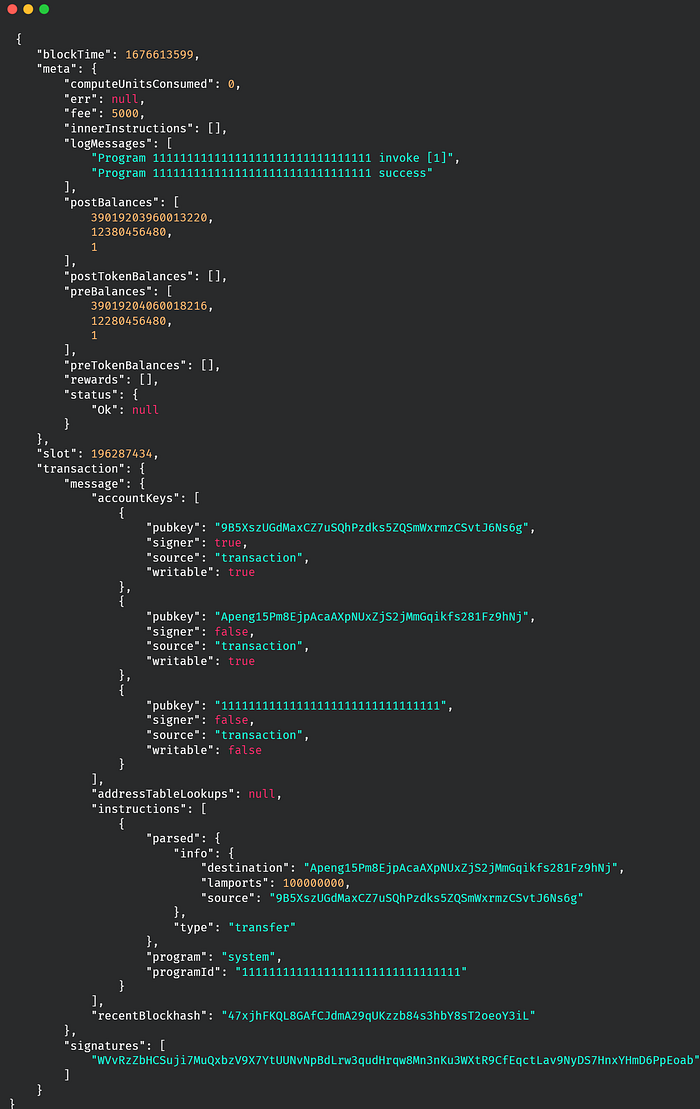
Raw Transaction
On the other hand, parsed transactions provided by SHYFT APIs provides already processed information which are humanly readable and can be displayed directly in the front end without any processing overheads. Following is an example of a parsed transaction from SHYFT, if we take a close look at the actions and protocol fields, we can get a clear idea that an NFT_TRANSFER has taken place, and the involved parties are indicated in the receiver and sender fields.
Press enter or click to view image in full size
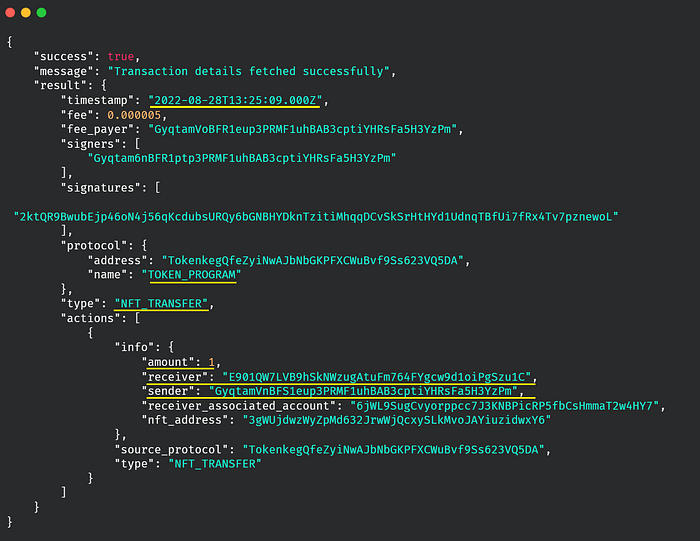
Parsed Transaction Data using SHYFT APIs
Human Readable parsed transactions can be useful in various dApps such as Wallet explorers, NFT marketplaces, or any other applications where decoded transaction data is displayed to the users. The added support for pagination removes several additional overheads, making this API a comprehensive solution for application development around parsed transactions on Solana.
If you enjoyed building along with this article, feel free to check out our other articles on getting wallet data on Solana or creating an NFT Launchpad on Solana using SHYFT APIs. We hope you have a great time building dApps on Solana with SHYFT APIs.
P.S. We have added an all-new JavaScript SDK to our arsenal, feel free to check it out here.
Resources
SHYFT API Documentation
Shyft Website
Get API Key
GitHub
Join our Discord
JavaScript SDK
Try out our APIs on Swagger UI
Related Posts

How to stream and parse Pumpswap transactions on Solana
In this article we will explore streaming and parsing pump swap AMM transactions using gRPC ...
January 24, 2026
How to get parsed Pumpswap AMM Pools on Solana
In this article, we will explore how to fetch parsed pump fun’s newly introduced pump AMM data ...
January 23, 2026
How to stream Bonding Curve Transactions on Pumpfun
A comprehensive guide on tracking Bonding Curve transactions on pump fun with gRPC ...
January 22, 2026

Get in touch with our discord community and keep up with the latest feature
releases. Get help from our developers who are always here to help you take off.